Tuesday, November 24, 2015

Hyperboloids from Bamboo Skewers

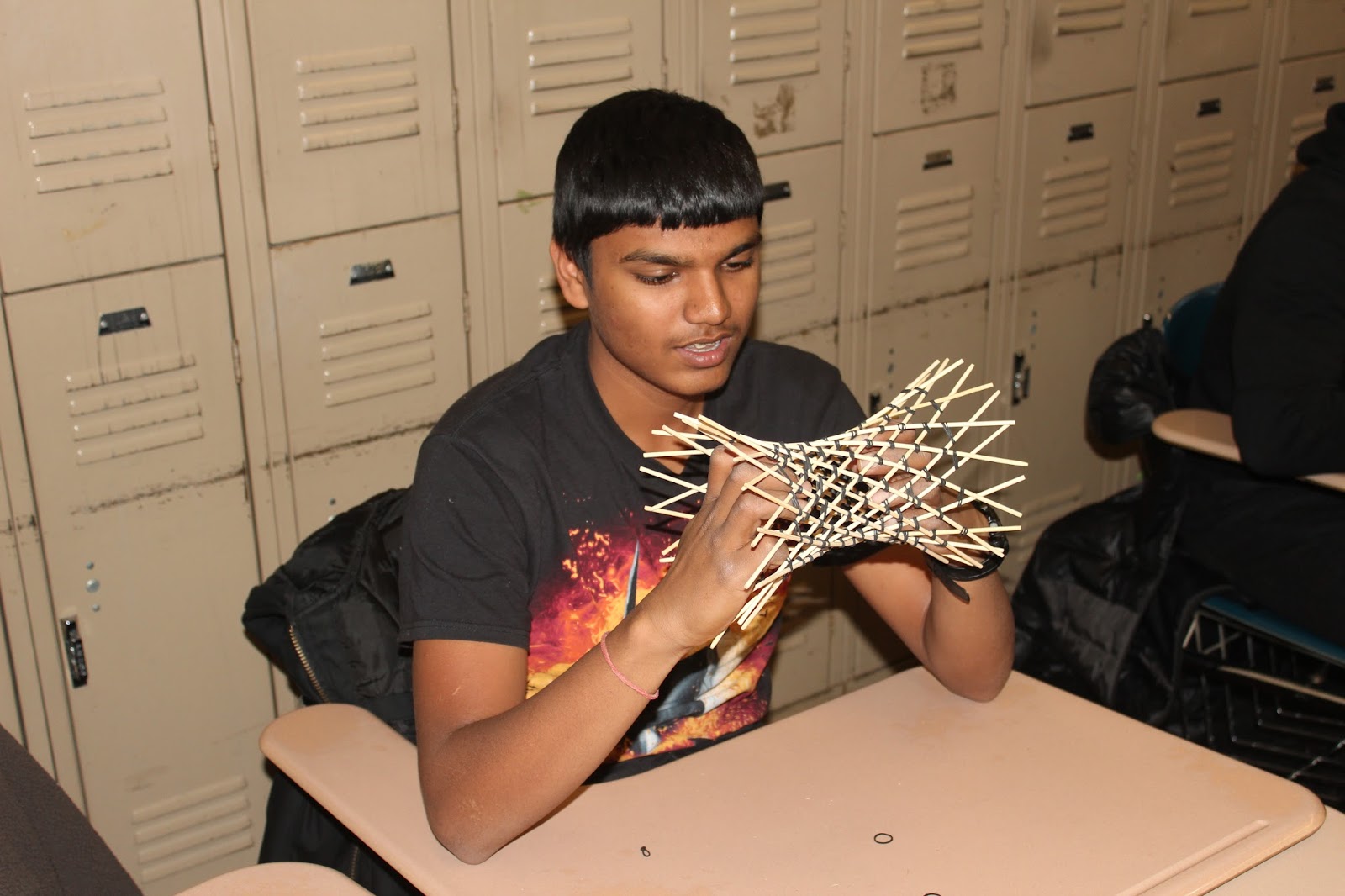
I was fortunate to have a visit today from Dr. George Hart (sponsored by Math for America). George led students in an activity building hyperboloids from barbecue skewers and hair rubber bands. I combined my AP Calculus BC students with a colleague's AP Statistics students for this double-period workshop.

First George explained some of the basic geometry of hyperboloids. One interesting thing in particular is that, while the surface of the hyperboloid is what we would normally call "curved," each point on the surface is the intersection of two straight lines.


The plan was to model a subset of the surface using bamboo skewers. For the model to work, we had to keep a regular pattern of "in front" and "behind." George explained this.


Basic plan was to pair skewers in the middle with a rubber band. Then we would attach pairs of adjacent ends. All the while we must maintain the "in front" and "behind" orientation properly.
 

Students began work.

Once they reached 12 pairs, they brought the ends around to join in a cylinder.

At this point, each pair of skewers is joined by one rubber band in the middle, and each interior skewer is joined to a neighbor exterior skewer by rubber bands at the top and bottom ends. To make room for more joins, the "end" rubber bands are slid in towards the middle. We'll then pair the ends to the new next neighboring skewer with a rubber band

This process is repeated until there are seven or more rubber bands holding each skewer to seven (or more) neighbors.


The constructed hyperboloid can be spread, or collapsed into a bundle of sticks.


Combinations are possible.


A good time was had by all (for the cost of a pack of skewers and a pack of rubber bands)



Monday, November 16, 2015

Hands-On Activity Workshop

As a Master Teaching Fellow at Math for America I have the privilege of participating in a variety of meaningful professional development opportunities. One such opportunity began this evening, with the first of a 3 session mini-course led by Dr. George Hart of Stonybrook University.

George first led us through a few drawing exercises -- draw a cube, draw a cube in an isometric projection style, draw a truncated cube, draw an icosahedron, draw a truncated icosahedron. At each step he gave us some pointers on key tricks to make our sketch a bit better. For example, judicious selection of the "front" can make the rest of the sketch so much easier.

In the background, we explored the relationship between vertices, faces, and edges. The point was not to derive Euler's formula, but it was a nice aside. (faces + vertices = edges +2) The real point though was to prepare us for a physical construction.

With our truncated icosahedron sketches as a guide, we took CD-R media and zip ties and began building a physical model of the icosahedron. CD with shiny side out represented the vertices, CD with dull side out represented the edges.

A good time was had by all.


Monday, October 19, 2015

Stuck in Tablet Mode

My desktop disappeared!

I've got a Lenovo Yoga ThinkPad, which I mostly use as a desktop, and sometimes use as a laptop, and rarely use as a tablet. I don't know if it's related to my Windows 10 upgrade, but last week after I flipped the computer open, it asked if I wanted to switch to tablet mode. Silly me, I clicked "yes."

The next day when I booted the machine, I had no desktop. Just the Windows 8 tiles. Ummm. Not what I wanted.

It took me a while, but I figured it out. It seems the default setting is, once you switch to Tablet Mode, that the machine will boot into whatever mode it was last in. I somehow was not doing whatever action triggers the sensor to know "get out of tablet mode" so it was just sitting like that. Other "features" of the mode are, you can't size windows -- they're either full screen, split screen, or minimized. Also, it seemed to randomly flash me back to the tile screen. Maybe that would be useful if I was actually using the machine as a tablet. Not sure.

Anyhow, here's the fix. From the Windows menu I went to Settings.
From Settings I went to System.
From System I went to Tablet Mode.
From Tablet Mode I was able to set the dropdown selection of "When I sign in ..." to say "Go to the desktop."

Problem solved. Took me a week.

Sunday, August 2, 2015

Soft Circuits Workshop

Attended a workshop on July 29 titled To Code and Beyond: Soft Circuits. Workshop was led by Dr. Kylie Peppler of Indiana University.

It was a rushed four hours, but I'm excited to further explore the concepts and techniques I heard about. First off, soft circuits is related to physical computing. We worked with electronic and electrical components attached to textiles (felt and t-shirts) using conductive thread connect piece to piece. There is a lot more subtlety to the concept that can be covered in a short workshop, but we focused on LilyPad Arduino microprocessors.

So now I'm working on my first solo project.

I've attached the LilyPad to an old shirt. As you do this, you have to think about the "wiring" that will eventually connect other components sewn to the shirt. I've chose to put the ground (negative) terminal to the top, thinking I'll route all the positive connections low, and then have all the components share a bus back to the negative high.

I'm not sure how expensive conductive thread is (we got a couple bobbins of stainless steel thread on leaving the workshop) but, to save I've attached the LilyPad using normal polyester thread. Note I've used an embroidery hoop to hold my surface flat. I've attached at the negative terminal, and digital terminal 11. From here, I'll use conductive thread.

I'm also not sure what will happen with the battery. The Arduino needs power, but that lithium ion battery shouldn't be just dangling. On the other hand, I need to be able to detach it easily for washing, so I can't sew it firmly in place. Needs some thought.

Saturday, April 18, 2015

Learning Ruby part III

Starting flow control.
If statements.
Behavior as expected. Note the comparison operator uses double equals ==. A single = is an assignment operator.
Note that elsif is not spelled correctly. That took me a while to realize why the code didn't work right.
unless checks for false value, opposite of if
exclamation as a prefix is like "not" -- != means "not equal"
&& conjunction
|| disjunction
How to use if, else, and elsif
How to use comparators / relational operators like ==, !=, <, <=, >, and >=
How to use boolean / logical operators like &&, ||, and !

String control with a daffy duckifyer. gsub

Check substrings .include?

Starting loops
while, until, for
no increment operator like ++ or --
instead, uses += with an delta value
range in 1...10 (exclude the end value) or in 1..10 (include end value)

loop method -- the iterator
break to exit a loop
next to skip an iteration
arrays to store multiple values
another iterator .each

Learning Ruby part II

Basic tutorial at code.org was just that -- basic.
Now I'm trying their next tutorial, which seems to deal with input and string manipulation.

gets accepts user input
gets inserts a blank line after the input. the method .chomp removes the line
gets.chomp accepts user input without adding an extra line

Monday, April 13, 2015

Learning Ruby part I

I have been given a task which requires I learn Ruby. I will try.

I've installed Ruby on my laptop (from links at ruby-lang.org). I found a tutorial on code academy. So I'll see where this leads.

notes:
data types: number, boolean, and string
assignment operator: equal sign
exponentiation: **
modulo: %
print: sends to screen
puts: adds blank line after screen output. hmmm?
I see. print leaves the next output right there, puts goes to the beginning of the next line.

strings have .length
and .reverse
and .upcase and .downcase

hashmark for single line comments
=begin to =end for multi-line comments