Over Thanksgiving dinner we were discussing a calculation that had come up, and my wife (born and raised in Japan) commented that it was a "tsuru-kame (crane and turtle)" situation. My son and I, both puzzled, asked for an explanation of what a crane and turtle situation was. My wife was surprised I had never heard of it, and proceeded to try to explain the calculation algorithm. Unfortunately, too many years had intervened between her middle school, where she learned the technique, and the dinner, and she couldn't quite explain.
So we all looked it up later, and I, in the process, learned some interesting cultural tidbits, and also learned another algorithm for solving what I call coin problems. You've got some number of things with one value associated, and some number with another value, know the total number of things, and know the total value. Find the number of each item.
This is a typical lesson in New York's Algebra curriculum. It appeared in Integrated Algebra, Math A before that, and, I assume, in whatever name they gave Algebra before Math A. I assume it's in CCLS Algebra, as well. We teach to solve using the technique of simultaneous equations and substitution.
The Tsuru-Kame method (鶴亀) takes a different approach that seems more like using area to solve.
Let's pretend we have a bunch of cranes and turtles, totaling 10 animals. Let's also say that there are 34 legs all together in this menagerie. Cranes each have two legs, and turtles have four. So the difference between them is two legs. If we were to assume all the animals are turtles, we'd come up with 40 legs. This is six extra legs than we actually have. Divide that six by the difference between crane and turtle leg count (2) and we get three. So that is the number of cranes. Which means there must have been seven turtles. (Check: 3 cranes @ 2 legs is 6 legs, 7 turtles @ 4 legs is 28 legs, for a total of 34 legs. It works.)
This method avoids algebra, but is pretty intriguing to me. I am almost always happy to learn a new algorithm.
Sunday, November 30, 2014

Thursday, September 4, 2014
Twelfth Period
Back in June we were given our tentative teaching programs, and I was intrigued to see that I was assigned a Robotics class. Although I've played with Lego Mindstorms, I've never received any formal training in robotics. But I thought with a little support I could do this.
Through discussions with my Assistant Principal, and some outside help from a fellow who has helped set up similar programs in schools, we initially thought of using Mindstorm EV3. The weakness with the Lego is that students associate it with younger kids, and some of them tune out.
So, during the summer I wasn't too surprised to find that they had switched platforms to something called BoeBot sold by Parallax. I was sent a sample curriculum, and some ideas for working with the kits, and I began doing research, but also confirming that I would receive training.
The next day I was told that they had switched platforms again. This time it would be something called Vex with a curriculum from Intellitek. Fine. I don't care. I don't know anything about any of them, so as long as I receive training I will do whatever they buy.
Today was the first day of school. They still haven't decided for sure just what platform I'm to base this Robotics class on. I am still not scheduled for training in anything. But to keep things really interesting, my class has been split. I have half of the students during 8th period, as my fifth teaching period of the day.
The other half, it appears, have been scheduled to meet with me 12th period. Twelfth! We don't even have a 12th period. I have no idea what time it would meet if I were to try to show up for it. I'm told that some of the 12th period students came to the classroom during 9th period, but I wasn't there. I only teach 1-8, and was taking care of paperwork during 9th period.
(I've also heard that administrators at my school have scheduled a meeting next week with some people to decide what platform I should be using in my class. Which started already. In case I didn't emphasize that already. That it's really late to be making these decisions. And why not just use that last one I heard about in the summer.)
Through discussions with my Assistant Principal, and some outside help from a fellow who has helped set up similar programs in schools, we initially thought of using Mindstorm EV3. The weakness with the Lego is that students associate it with younger kids, and some of them tune out.
So, during the summer I wasn't too surprised to find that they had switched platforms to something called BoeBot sold by Parallax. I was sent a sample curriculum, and some ideas for working with the kits, and I began doing research, but also confirming that I would receive training.
The next day I was told that they had switched platforms again. This time it would be something called Vex with a curriculum from Intellitek. Fine. I don't care. I don't know anything about any of them, so as long as I receive training I will do whatever they buy.
Today was the first day of school. They still haven't decided for sure just what platform I'm to base this Robotics class on. I am still not scheduled for training in anything. But to keep things really interesting, my class has been split. I have half of the students during 8th period, as my fifth teaching period of the day.
The other half, it appears, have been scheduled to meet with me 12th period. Twelfth! We don't even have a 12th period. I have no idea what time it would meet if I were to try to show up for it. I'm told that some of the 12th period students came to the classroom during 9th period, but I wasn't there. I only teach 1-8, and was taking care of paperwork during 9th period.
(I've also heard that administrators at my school have scheduled a meeting next week with some people to decide what platform I should be using in my class. Which started already. In case I didn't emphasize that already. That it's really late to be making these decisions. And why not just use that last one I heard about in the summer.)
Tuesday, June 10, 2014
Leaving for Kansas City
For the first time, I've been invited by Education Testing Service to join in the grading (called "reading") of AP Calculus exams. So I'm heading off to Kansas City for a week to sit with hundreds of other math teachers and read AP Calculus exams from around the world.
I think this is very cool, and I'm really looking forward to it.
I think this is very cool, and I'm really looking forward to it.
Sunday, June 1, 2014
Sometimes I Think They Don't Know English
Following are excerpts from a student responses on a geometry quiz about locus.
The locus of points is the radius of a circle of 2 units
The locus of points is a parallel line radius = 2
The two points are equidistant from each other
The locus is the center with a radius of 3
The locus is a line bisector
The lines are parallel and the locus is their angle bisector
The locus is equidistant and parallel lines. and maybe a circle. maybe.
The locus is two circles that intercept
Point A is the center of a circle with all points equidistant by four units
Two lines cut two points connected by a 2 units line from the midpoint of the 6 unit long line
The locus of points is the perpendicular bisector of the angle
The locus of point is a parallel line line of the segment
I used the midpoint formula to find the locus and it is equidistant from 2 units of (2, 4)
The lines are parallel from the distance
The loci is the midpoint of two equidistant lines that have two points
Rise over run
The locus of points is the radius of a circle of 2 units
The locus of points is a parallel line radius = 2
The two points are equidistant from each other
The locus is the center with a radius of 3
The locus is a line bisector
The lines are parallel and the locus is their angle bisector
The locus is equidistant and parallel lines. and maybe a circle. maybe.
The locus is two circles that intercept
Point A is the center of a circle with all points equidistant by four units
Two lines cut two points connected by a 2 units line from the midpoint of the 6 unit long line
The locus of points is the perpendicular bisector of the angle
The locus of point is a parallel line line of the segment
I used the midpoint formula to find the locus and it is equidistant from 2 units of (2, 4)
The lines are parallel from the distance
The loci is the midpoint of two equidistant lines that have two points
Rise over run
Tuesday, May 20, 2014
Game Piece
My colleague, Ms. Luna, has assigned her AP Calculus students a year-end project. They are, in groups, to create a game, based on some board game they already know, but with a Calculus theme. I enter the picture because these students imagine that they can come to me and simply say "print me something like a game piece," and I'll immediately be able to fire up my 3D printer and print out exactly the piece they are imagining. When I try to get them involved in actually designing whatever it is they want, they usually turn and walk away.
This morning I had a student, N, who was willing to work on design. (right there, it makes me happy) So we sat together and I tried to get N to give me her specifications. I tried, bit by bit, to nudge her towards speaking in terms of geometric solids.
I eventually got N to describe the game piece as a cube with a sphere sitting on top. We drafted the idea of the cube as the intersection of inequalities in the x, y, and z directions. Equation of a sphere is standard, and wasn't a problem once we decided radius and how much it should overlap the cube. From there I was able to work on designing in Mathematica. We wound up with
RegionPlot3D[Abs[x] < 1/2 && Abs[y] < 1/2 && Abs[z] < 1/2 || Sqrt[x^2 + y^2 + (z - 5/8)^2] < (5/8)^2, {x, -1, 1}, {y, -1, 1}, {z, -1, 2}, PlotPoints -> 50, BoxRatios -> Automatic]

I exported the plot to .stl, and opened the file in MakerWare. As usual, MakerWare wanted me to scale the drawing. She wanted two game pieces, so I copied the scaled piece a little to the right. Lately I've been printing almost everything with a raft, so I selected the raft option, reduced the solid fill to 7% (default was 10%), and clicked print.


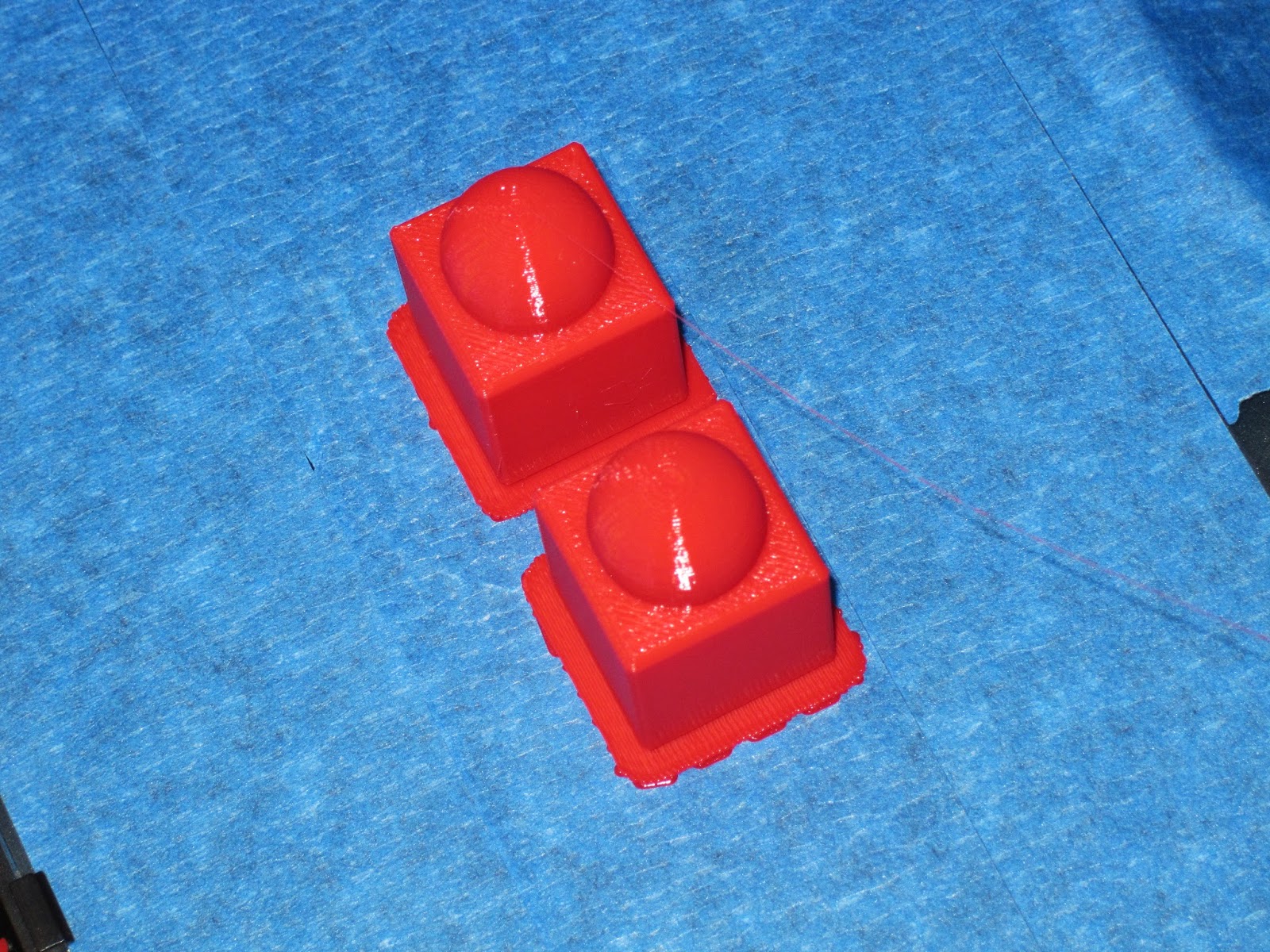


Printing went fine. I was about to break off the raft when N stopped me. "No! I like that!" Okay by me.
This morning I had a student, N, who was willing to work on design. (right there, it makes me happy) So we sat together and I tried to get N to give me her specifications. I tried, bit by bit, to nudge her towards speaking in terms of geometric solids.
I eventually got N to describe the game piece as a cube with a sphere sitting on top. We drafted the idea of the cube as the intersection of inequalities in the x, y, and z directions. Equation of a sphere is standard, and wasn't a problem once we decided radius and how much it should overlap the cube. From there I was able to work on designing in Mathematica. We wound up with
RegionPlot3D[Abs[x] < 1/2 && Abs[y] < 1/2 && Abs[z] < 1/2 || Sqrt[x^2 + y^2 + (z - 5/8)^2] < (5/8)^2, {x, -1, 1}, {y, -1, 1}, {z, -1, 2}, PlotPoints -> 50, BoxRatios -> Automatic]
I exported the plot to .stl, and opened the file in MakerWare. As usual, MakerWare wanted me to scale the drawing. She wanted two game pieces, so I copied the scaled piece a little to the right. Lately I've been printing almost everything with a raft, so I selected the raft option, reduced the solid fill to 7% (default was 10%), and clicked print.
Printing went fine. I was about to break off the raft when N stopped me. "No! I like that!" Okay by me.
Wednesday, April 16, 2014
Lissajous
Finally, I've got some moderate success to report with my Lissajous figure.
Yesterday I tried printing with raft and supports (because of printing difficulties without).


So the figure printed, although it took a long time (a little over two hours) because extruding all the extra plastic for the supports was a significant addition. Then, afterwards, the supports needed to be broken out.
And that's where the issues arose. Even though I repaired the .stl file with visCAM and netfabb, the intersections points were still weak, and I could see light coming through them. They didn't appear to be solid connections. The physical stress of breaking off the supports was more than the structure could deal with, and it began to break. "Don't worry," people told me, "you can superglue it back together." But that's not the point. I wanted to print as a single piece.
I thought of taking the piece home and use my Dremel rotary tool to get the rest of the supports off. But I left school in a hurry, and neglected to pack it.
While doing whatever it is I do when not at work, an idea came to me -- rotate the figure 90 degrees in the y-z plane. The problem had been my horizontal spans had been too long, but by rotating I'd change those horizontals to verticals. Verticals don't typically have as much issue printing.
So that's what I tried this morning. Using the exact same .stl file, I used MakerWare to rotate, and printed with rafts but without supports. Success!

If anyone wants, here's the .thing on thingiverse.
*** change history ***
4/19/2014 added link to .thing file
4/16/2014 corrected spelling
Yesterday I tried printing with raft and supports (because of printing difficulties without).
 |
| somehow reminds me of the World Series trophy |
 |
| removing supports with my handy dandy leatherman tool |
 |
| printed with supports, mostly removed, but lost integrity of the plot in the process |
While doing whatever it is I do when not at work, an idea came to me -- rotate the figure 90 degrees in the y-z plane. The problem had been my horizontal spans had been too long, but by rotating I'd change those horizontals to verticals. Verticals don't typically have as much issue printing.
So that's what I tried this morning. Using the exact same .stl file, I used MakerWare to rotate, and printed with rafts but without supports. Success!
 |
| small raft under each loop |
 |
| printing complete. I like the wisp of PLA trailing back to the print head. |
 |
| before removing the rafts |
 |
| after removing the rafts. hand modeling courtesy of Eloise. |
*** change history ***
4/19/2014 added link to .thing file
4/16/2014 corrected spelling
Saturday, April 12, 2014
Fixing 3D Designs
One of the things George warned us about is the possiblity that Mathematica might create an invalid .stl file when it exports. I don't understand the bug exactly, but somehow when it draws the .stl, which is composed of many triangles which have orientation, it might create some triangles either with orientation reversed, or with edges that don't align correctly. He suggested two tools to detect and fix these errors.
Since I had a problem printing my lissajous figure (see image below), I thought it might be from this sort of error. I downloaded and installed the first tool, VisCam, and it indeed found 24 flipped triangles. But this tool cannot fix. It can only check for errors. So I downloaded and installed the second tool, NetFabb. It took a while for me to figure this one out, but eventually I found the menu to check, and the menu to repair errors. But it wants to save only in its own format, and it took me a while to discover how to export back to .stl. Turns out the part has to be selected for this option to appear. Okay, obvious, but it took me a while.

Next week I'll try printing the repaired part, and I'll report back on how it goes.

Since I had a problem printing my lissajous figure (see image below), I thought it might be from this sort of error. I downloaded and installed the first tool, VisCam, and it indeed found 24 flipped triangles. But this tool cannot fix. It can only check for errors. So I downloaded and installed the second tool, NetFabb. It took a while for me to figure this one out, but eventually I found the menu to check, and the menu to repair errors. But it wants to save only in its own format, and it took me a while to discover how to export back to .stl. Turns out the part has to be selected for this option to appear. Okay, obvious, but it took me a while.
Subscribe to:
Posts (Atom)